Initial setup for the Pixel Tag couldn't be easier. All you have to do is put it next to your phone and remove the little tab sticking out from behind its battery cover. This turns it on and after that, you'll see a little notification on your phone to finish the onboarding process, which includes pointing you to the Play Store to download the Find Hub app (assuming it isn't installed already).
From there, you can give the Pixel Tag a proper name, specify what it's going to be tracking and then you're pretty much good to go. If the tracker is attached to an item used by multiple people, you have the option of sharing ownership inside the app, so everyone can see where it is. You can also tell the app to notify you when you leave something behind, to prevent you from getting all the way home before realizing that your bag is still, say, at the restaurant. And naturally, there's also a handy map that will show you exactly where the tracker was last seen, powered by Google's Find Hub network and the millions of participating Android devices that help the Pixel Tag triangulate its location.
In the event that your Pixel Tag and the object it's attached to go missing, you can press a button in the app to make the tracker play a sound. Alternatively, you can also hit the Find Nearby function to launch a mode that will help you hone in on the device's location. For people with phones that support ultra wideband, you'll sometimes even get an extra level of accuracy that includes little arrows on the screen to prevent your search from turning into a game of Hot or Cold.
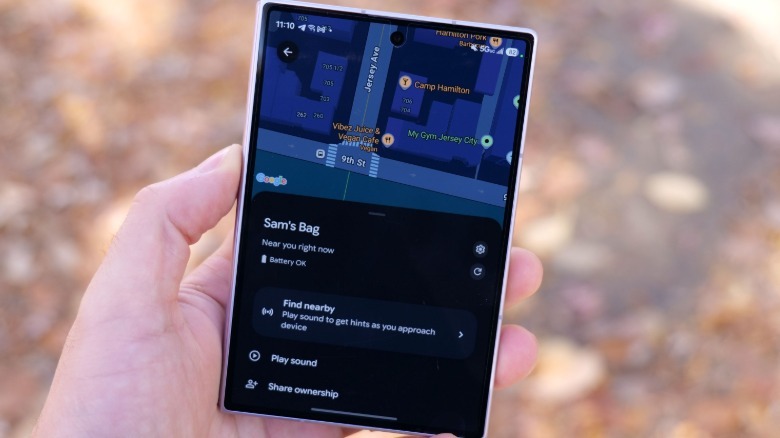
That said, it's not 100 percent bulletproof, because I noticed that after I asked my son to hide the Pixel Tag somewhere in our home, I wasn't always able to see the on-screen arrows (or sometimes they would be pointing the wrong direction) when searching for it, which I attribute to stuff like walls and furniture causing interference with its tracking capabilities. Still, it was always good enough to get me in the right ballpark and from there I simply had it play a sound to finally nail down the tag's position.
For further testing, I asked my wife to stash the tag in her purse while she went to a doctor's appointment and it worked great then too, even over much longer distances. However, I did notice that Google has included some welcome privacy features, which includes the tag giving her phone a notification that there might be a device following her. I also discovered that when she was in a car, the Pixel Tag's location was much slower to update in real time, but in my view, that's a feature not a bug. This thing isn't meant to spy on other people, so I appreciate that there are built-in precautions for anyone trying to use it for that.
And if you do genuinely lose the tracker (and presumably the item it's attached to), you can mark it as lost, allowing you to pin a phone number, message and an email, so that if a good samaritan finds it, they'll be able to see that info on their phone and have the ability to reach out and return it.