The UniFi family from Ubiquiti Networks has always impressed us with their classy networking solutions, which include an excellent range of Wi-Fi 7 access points (APs) for businesses of all sizes. Along with outdoor and wall-mounted versions, you have a fine choice of indoor tri-band models and the U7 Pro Max on review heads up Ubiquiti's 2.5GbE-enabled Flagship APs.
This sleekly designed AP targets high-density environments with more than 500 connected devices and presents eight spatial streams for improved coverage. It also has a dedicated radio for real-time spectral analysis so it can run non-disruptive scans – a feature not present in the entry-level U7 Pro.
At launch, the U7 Pro Max didn't support the Wi-Fi 7 MLO (multi-link operations) feature but this has been rectified with the latest stable release firmware resolving earlier MLO connection issues, delivering better 6GHz power management and adding a new Force Wi-Fi 4 mode for improved compatibility with legacy wireless clients and IoT devices.
Ubiquiti Networks UniFi U7 Pro Max review: Design and specs
The U7 Pro Max is superbly built with a solid polycarbonate cover and metal chassis. The box includes metal plates and a complete toolkit with all components needed for wall or ceiling mounting.
This BE15000-rated AP presents two spatial streams for the 2.4GHz radio, four for 5GHz plus two for 6GHz and claims to deliver up to 688Mbits/sec on 2.4GHz, 8,648Mbits/sec on 5GHz and 5,765Mbits/sec on 6GHz. Be careful selecting the 5GHz 160MHz or 240Mhz channels, as this enforces the use of DFS (dynamic frequency selection), which may result in connection instability.
The U7 Pro Max presents a 2.5GbE multi-Gigabit port supporting an 802.3at PoE+ power source, which you'll need as the AP doesn't have a socket for an optional power adapter. Your other option is to use a PoE+ power injector, and Ubiquiti's own version with a 2.5GbE port only costs around £20
Ubiquiti Networks UniFi U7 Pro Max review: Management choices
Management options are outstanding, as you can install the free self-hosted UniFi OS Server for Windows, macOS, and Linux or use Ubiquiti's chargeable Official UniFi Hosting cloud service, which starts at around £25 per month. You also have a huge range of UniFi Cloud Gateway on-site appliances to choose from, and for testing, we used the lab's UniFi Dream Machine Pro (UDM Pro) appliance.
Sign up today and you will receive a free copy of our Future Focus 2026 report - the leading resource for IT decision-maker insight on priorities and investment areas in AI, security and more.
This 1U appliance costs around £340 and presents 10GbE SFP+ and Gigabit WAN ports along with eight Gigabit LAN ports. It teams up wireless network management with gateway cybersecurity, video surveillance, premises security, IoT and VoIP services, plus the free InnerSpace network visualization tool.
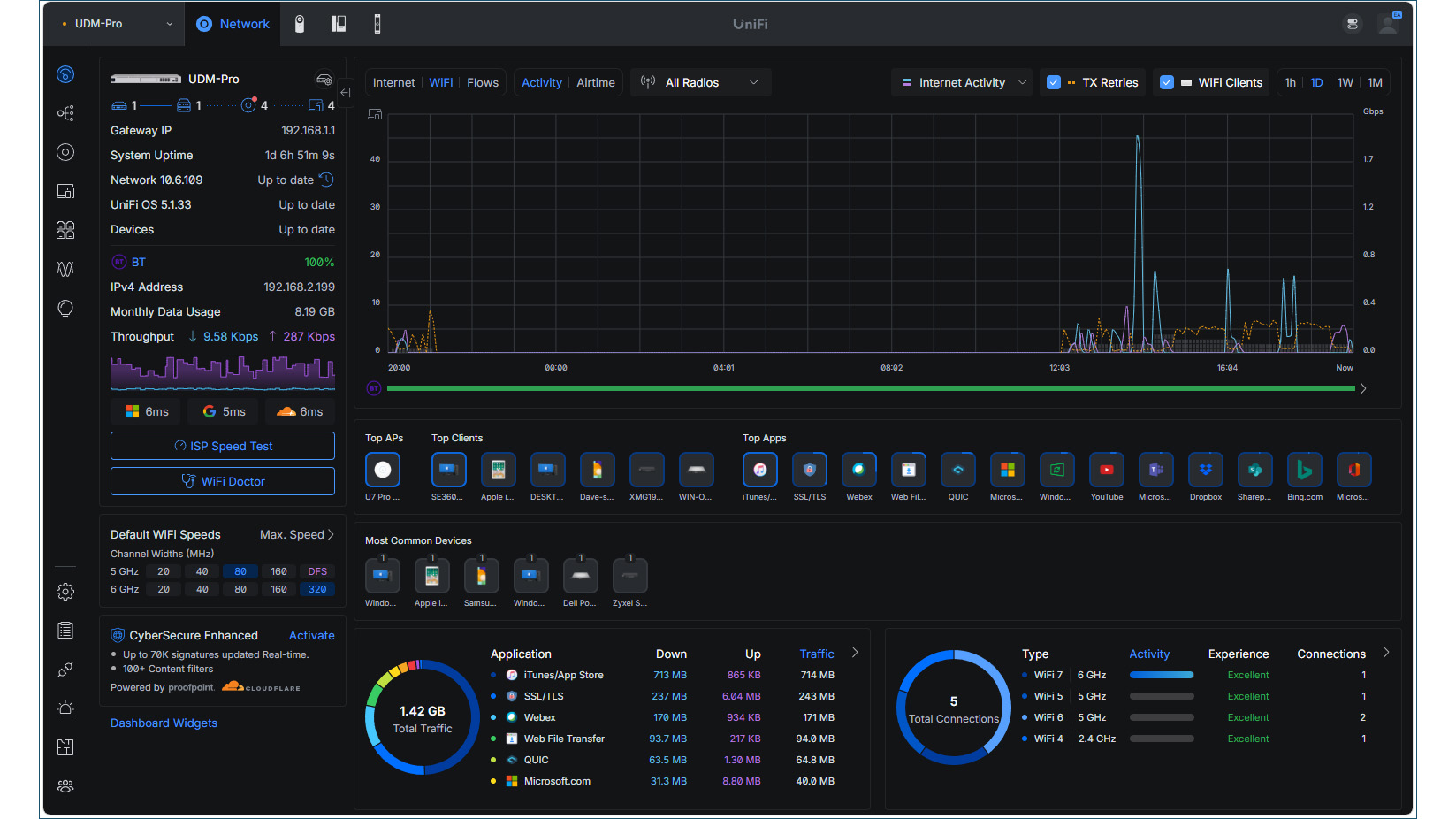
We could view all remote gateways from our Ubiquiti Site Manager cloud portal, and selecting the UDM Pro transported us to its own management console. This is a joy to behold, as it provides everything you need to know about your networks with detailed topology views, lists of all managed UniFi devices, and deep insights into connected clients with a complete traffic breakdown along with icons showing the top detected apps and their individual bandwidth usage.
SSIDs are created from the console's settings page, where you assign radios and choose from a range of options including the preferred encryption scheme, client isolation, rate limits plus captive portals. From the IoT Optimization section, you can enable the new Force Wi-Fi 4 mode so legacy clients don't get confused by all the new Wi-Fi features.
Ubiquiti Networks UniFi U7 Pro Max review: Easy AP deployment
As our UDM Pro appliance only has Gigabit LAN ports, we hooked up our Zyxel XMG1930-30HP 10GbE PoE++ switch to it, which was instantly recognised and added to the network topology view. Deploying the U7 Pro Max was a breeze, as after connecting it to our Zyxel switch, it appeared in the console as soon as it came online and, after adoption, it received a firmware upgrade and then presented all our predefined site SSIDs.
Selecting the AP from the UniFi devices page brings up a right-hand menu where you can decide which radios are active and choose their channel widths. From the radio management page, we enabled the Wi-Fi 7 320MHz channels along with MLO, which enforces the mandatory WPA3 encryption and PMF (protected management frames).
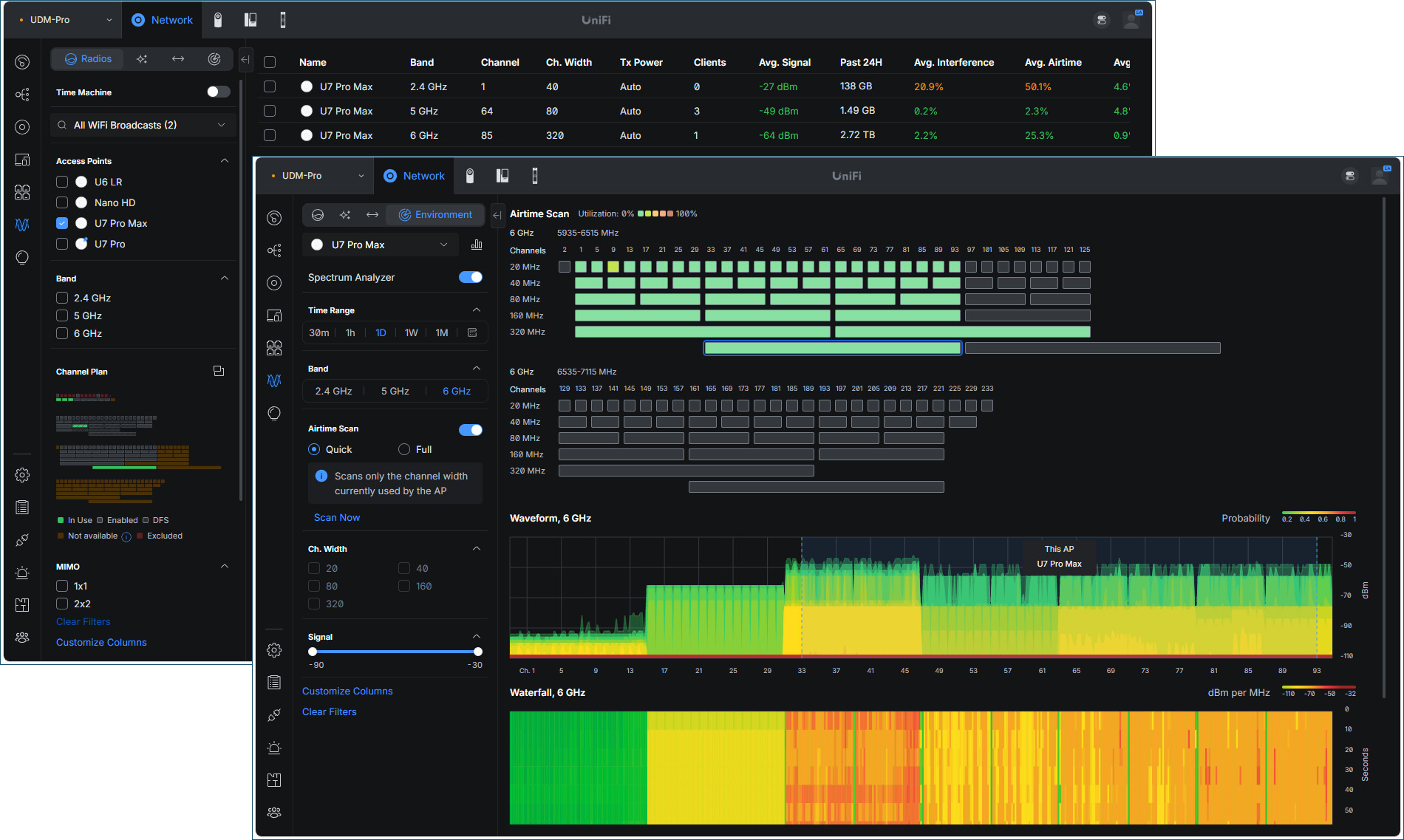
Network monitoring services are incredibly good, with graphs provided for WiFi health plus views of airtime, connected clients, and performance stats for the selected AP. The Insights page reveals plenty of details on detected apps, and we love the topology view, which shows how each device is connected, with the internet traffic monitor presenting animated real-time flow lines between each device so you can see who is using the most bandwidth.
To view the AP's spectral analysis, you select the AirView menu and Environment tab at the top. This presents charts across all three frequency bands for waveforms and historical waterfall spectrum usage – handy for troubleshooting and identifying network congestion.
Ubiquiti Networks UniFi U7 Pro Max review: Wi-Fi 7 performance
For performance testing, we called up a Lenovo desktop client running Windows 11 Pro and equipped with a TP-Link Archer TBE550E Wi-Fi 7 PCIe adapter. On the LAN side, we used a Dell PowerEdge Windows Server 2025 host connected to the Zyxel switch over 10GbE.
To test maximum speed, we used the excellent OpenSpeedTest HTML5-based tool and ran the server component of our Windows Server host. Starting with a single 6GHz link on the Windows 11 client and a reported connection speed of 5,764Mbits/sec, we pointed a browser at the OpenSpeedTest server address and port and watched it report back with very good close-range upload and download rates of 274MB/sec and 223MB/sec.
With MLO enabled, the Windows 11 client created a 2.4/6GHz link and showed a connection speed of 6,453Mbits/sec. Subsequent runs of OpenSpeedTest saw an increase in close range performance, with upload and download rates of 305MB/sec and 235MB/sec. We did notice that the base gets quite hot when the AP is under load, so bear this in mind when choosing a suitable mounting location.
Ubiquiti Networks UniFi U7 Pro Max review: Is it worth it?
The U7 Pro Max is listed on Broadbandbuyer at £236 excluding VAT, making it an affordable choice for most businesses. Broadbandbuyer sweetens the deal even further by offering a free 3-year UniFi Cloud Hosted account with dedicated UK-based support and a pre-provisioning service so you can plug and go.
This tri-band business Wi-Fi 7 AP is easy to deploy and offers good performance, but the headline feature is the UniFi platform. It delivers a stunning range of cloud management and wireless network monitoring services, and we rate it as one of the best solutions on the market.
Ubiquiti Networks UniFi U7 Pro Max specifications
|
BE15000 tri-band 2.4/5/6GHz 802.11be |
||
|
2 x 2.4GHz, 4 x 5GHz, 2 x 6GHz |
||
|
Ceiling/wall mount kit included |
||
|
2.5GbE LAN/802.3at PoE+ |
||
|
206 x 46 x 206mm |
||
|
680gms |
||
|
2 years standard |