Your speed test looks great, but your games don't. The problem might be closer to home.

You can download huge files in no time at all, but online games are still slow and video calls are a series of "sorry, you go first" moments. In the meantime, your speed test is brazenly reporting 500 Mbps, as if that's supposed to put the matter to rest.
Ping is the missing number here: it measures the time it takes for data to travel to a server and back. Bandwidth refers to the maximum rate at which data can be transmitted through your connection, which is typically what your internet speed represents. However, this doesn't necessarily indicate the speed of response for individual requests. A 50ms ping or under is great for most online games, but at, say, 800ms, it takes almost an entire second for the round trip.
Sudden fluctuations in latency (jitter) and lost packets only exacerbate the situation. Even on a high-speed connection, congestion at home and on the way to a far-flung server can cause problems.
Your home network might be making the situation worse
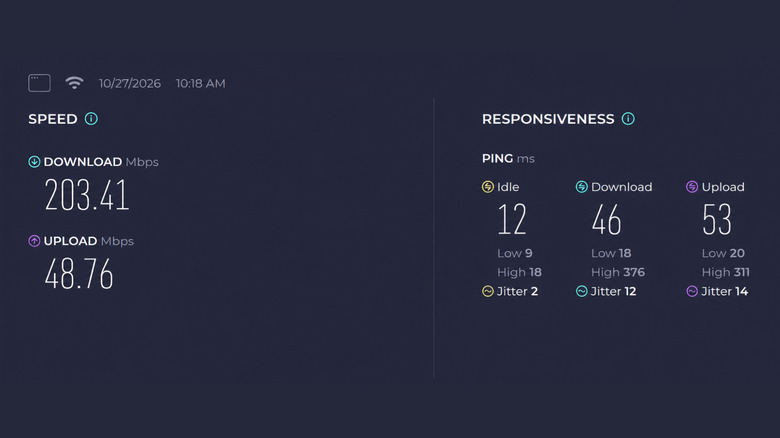
Let's say your phone is uploading vacation videos to the cloud while you're in a video meeting on your laptop. If the upload consumes all available bandwidth, packets from the call can get stuck waiting behind other traffic, creating excessive queuing delays known as bufferbloat. A large game download can create similar issues even if it's on a totally different device.
The number of connected gadgets matters less than what they're doing. To find out if congestion is the real problem, use Ookla's Speedtest and compare the idle, download and upload ping numbers. If latency increases during load, you should pause automatic updates, cloud backups and other large transfers, then test to see if your game or call improves. You can also restrict those transfers or set them to run later when you aren't doing anything else online. Another tool to test this specific problem on your network is Waveform's bufferbloat tester.
If lag spikes are still occurring, connect your PC or console using an Ethernet cable to rule out Wi-Fi interference. If you're using a phone, try getting closer to the router and changing to 5GHz Wi-Fi.
Lastly, if your connection still doesn't perform well when under load, check your router's app or admin page for Quality of Service (QoS) or Smart Queue Management (SQM). These settings can manage congestion, but some configurations may slow down the maximum download speed. Nine out of 11 routers were found to improve latency under simulated congestion with QoS enabled in a 2025 evaluation.
Distance and routing can drive your ping up
Even if you have a quiet home network, connecting to a server halfway around the world can still drive up your ping. A player in London connecting to a game server in New York has to send inputs across the Atlantic and wait for the responses to travel back. A suitable European server would generally shorten that trip; after all, spending more on your internet plan doesn't bring New York any closer.
The path itself is another issue, as internet providers don't necessarily route traffic over the shortest path. Two people in the same area can experience different ping if their data travels through different paths. EA says the geographically closest game data center isn't always the one offering the best connection.
A speed test can be misleading here because it measures latency to a test server, not the one hosting your game. A perfectly respectable result to your ISP's server in the nearest city won't tell you how responsive an online match will be if the nearest game server is 500 miles away.
Rather than relying on the headline download speed, check the connection statistics of your game and compare the available server regions. If only one game is having issues, check the status of the server or select a different region. If you get high ping on all services while using a quiet, wired connection, it's time to talk to your ISP before buying new hardware.
For instance, in , press on the bottom-left of the launch screen before choosing . You can compare the available servers' ping and packet loss before choosing one.