The Back Display uses the same display tech as the Xiaomi 18 Pro series' screen, peaking at 4,000-nit brightness and up to 120Hz refresh rates, though chances of seeing those upper limits are probably few and far between. Both the back display and camera array are protected with a single Corning Gorilla Glass Victus cover, making a surprisingly busy back look a little more cohesive.
The Back Display's functions fall into two main categories. First, like the flip foldables we've seen in recent years, it works as a display for the phone's primary cameras. The back display's viewfinder automatically switches to ultra-wide if it spots three or more people in the shot, but otherwise it's a stripped-down version of the camera app. While it makes sense, given the smaller screen space for buttons and modes, it relegates many shooting modes and features to the main camera app on the phone's main screen.
Alongside the notifications and information feeds we've seen on phones like Samsung's Z Flip series and Motorola's Razr phones, including calls, maps and weather, Xiaomi adds a pin-to-back function that lets you attach text and images for quick reference. The company suggests pinning boarding passes and QR codes, but you could also add a cute pic of family or pets. It's also the first rear display to support apps like Spotify, YouTube Music and Google Maps – hopefully more apps will join those. Xiaomi said Gemini Live can run on the rear display, but I haven't been able to get it to work on my 18 Pro yet.
The new feature on this year's Back Display lets you program your own mini apps, similar to how you can program the iPhone's recent AI-infused Shortcuts. Using GenAI, you can describe a lightweight app or function, and the Xiaomi 18 Pro will attempt to make it a reality. It's a clever way to sidestep the difficulty of getting app developers on board with niche screen sizes and proportions. Xiaomi promises over 50 preset apps at launch, although the selection was much more limited on the Xiaomi 17 Pro I've been using.
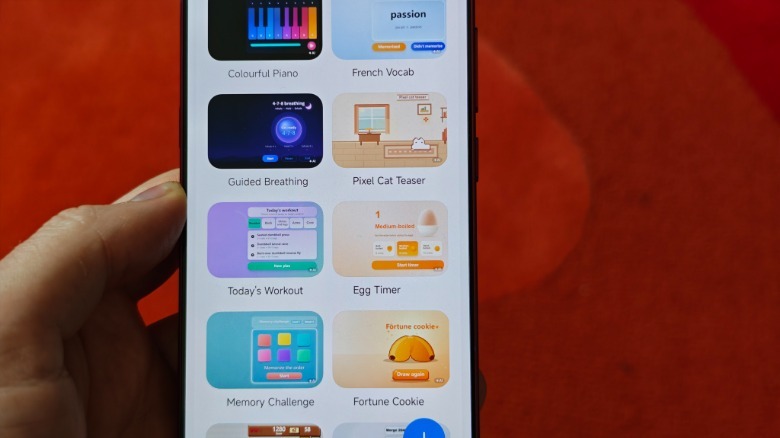
It's not about making dense, full-size apps, but rather simple, single-purpose (interactive) widgets. There's something to this idea, but I couldn't quite get apps to behave or look the way I wanted. One idea: a faux wallpaper that would generate screen cracks and glitches when touched. Regardless of how many times I asked the phone not to include an on-screen crack counter, ruining the appeal of my lame 'prank', subsequent vibe-coded builds still featured a counter.
I also tried to create a guess-the-flag quiz, but it seemed to lean heavily on the 25 or so countries that most of us could answer, easily. When I asked it to increase the flag range by 100 more, the phone struggled to generate a new mini app, even though I assumed it was an easy expansion of the initial premise. There are some smart implementations, including a button to 'polish' the idea you wrote to make it more palatable to generative AI.
It's a little sluggish to both refine and generate these mini-apps, especially if you've dipped your toe into genAI coding elsewhere, which is usually pretty swift. The feature requires an internet connection to work and it's not entirely clear whether they're generated on-device, which might explain slower processing.
Wallpaper options for the tiny rear display also include AI Group photo wallpapers, which I'm less sold on, which combine two different subjects into a group photo. You can even create composite portraits of celebrities and fictional characters – maybe this just isn't for me. I'll go back to my flag guessing.
The primary screens on both phones feature Xiaomi's Privacy Display technology, which can be assigned to toggle on with specific apps (like banking apps, photo galleries, dating apps and more). This extends to notifications and even floating windows and split-screen versions of those apps — it's a better implementation of the privacy display tech we saw on Samsung's Galaxy S26 Ultra. In settings, you can even enable a gaze detection mode that notifies you if the front-facing camera recognizes someone possibly peering at your phone. The 18 Pro will notify you on-screen or with a more subtle vibration.