If you feel like Homer Simpson backing into the hedges has been overdone, OpenAI offers a new option for creating the right GIF for the moment.
There's an art to selecting the perfect GIF. And by now, you likely know all the old reliables, from Elmo amid flames, to Michael Scott from screaming, "Noooooo!" But if years of GIFs clipped from TV shows and movies isn't cutting it, OpenAI will now let you make and edit your own.
OpenAI rolled out Images 2.6 for ChatGPT, Codex and the API on Nov. 4, 2026. The update introduces the ability to create GIFs using a prompt or photo. Once you've created the GIF, you can also edit the image before saving or downloading.
OpenAI claims people generate more than 500 million images each day, on average. How many of those end up being GIFs remains to be seen. In any case, if you're interested in turning the weirdest ideas floating around in your head into animated images you can inflict on your group chat, here's how to do it using Images 2.6 and ChatGPT.
How to create a GIF with ChatGPT
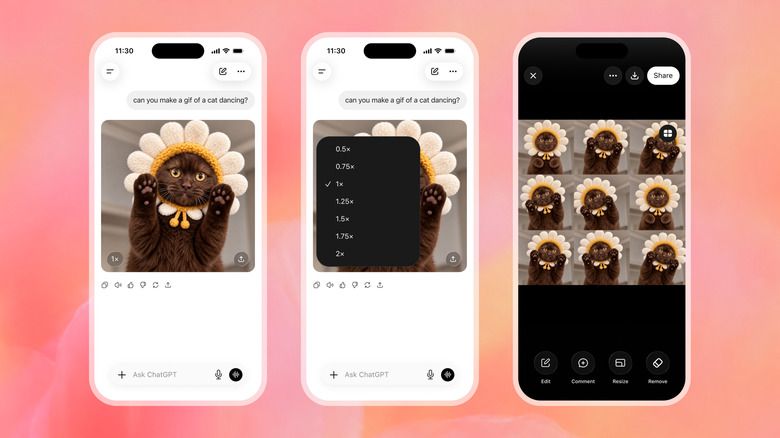
Log in to ChatGPT, and type your prompt into the box at the bottom. Remember: A good prompt goes a long way. For example, you could ask for a a GIF of a tortoiseshell cat yawning. According to OpenAI's blog post, Images 2.6 should generate images about 50 percent faster than the previous iteration.
Once you have your GIF, there are a few ways you can tweak it. For one, you can change the speed so that it loops faster or slower. In the bottom left of the image, you'll see a number like "1x." Click that to modify the speed. You can also click or tap the image itself and tap Edit. A box will appear that says "Describe edits," and you can prompt ChatGPT to make changes. You can also click or tap "Sheet," which will show you the individual frames of the GIF and make comments and markups.
When you're happy with your GIF, you can download it or share it using the Download and Share buttons.
What else is new in Images 2.6
GIFs aren't the only update to Images 2.6. Aside from typing in a prompt, you can upload a photo and use it to make a GIF. OpenAI's blogpost explained that you can even upload a minimal sketch of something, like an owl, and use that as a basis for creating a GIF. You can also save and tag it as a reference image to use again in the future. This applies to people, pets and characters.
Via the API, developers also have the option to choose between Flare and Sunburst, depending on how fast, detailed and consistent they need their image generation to be.
Images 2.6 is available to everyone through ChatGPT and Codex, so you don't need a subscription to access it. However, your subscription, or lack thereof, will determine how many images you'll be able to generate.
So, if you feel like Homer Simpson backing into the hedges has been overdone, you've got a new option for creating the right GIF for the moment.